No bulk API in the console — so let the browser do the clicking.
Background
Personalized products — the ones where a shopper types their own text, picks a color, swaps the artwork — are the most expensive thing to set up in a seller console. Every product needs its custom regions drawn by hand: the X/Y/width/height of each print area, the character limit on text fields, the palette of selectable colors, the alignment. One set per SKU color, and a single product can have a dozen of them. Then come SKU specs, size charts, sensitive attributes, package dimensions, weight, declared price — and one more pass to reprice every group before it goes live.
None of those pages expose a bulk API. Operators click through them one field at a time: minutes per product, days for a few hundred. This tool carves out the four most repetitive stretches and turns them into batch jobs — coordinates and parameters come from local config, the browser does the clicking, and people are left with reviewing results and handling failures.
Task-table state machine
QThread execution
stdout piped to log pane
CSV / Excel templates
QueueRegionsText positionsRepricingAdd SKUOne shared lifecycleconnect → run → close
Semaphore-bounded concurrency
Status callbacks to the GUI
Supply-chain ERP — product inbox
Seller center — templates / SKUs
Listing center — group repricing
Same context — parallel pages
Their browser, their login session
Four automated jobs
Pages through the supply-chain ERP inbox collecting IDs for personalized products and appends only what's new to the local CSV. It stops at the first ID it already has, or at an explicit stop ID — so re-running never duplicates rows.
Looks up the custom regions for each SKU by (template, SKU color) from JSON, uploads the matching background image, then sets each region's type, geometry, character limit, selectable color stack, and alignment — up to 9 regions per SKU.
Takes an Excel/CSV with one SKU per row (10 columns: code, spec, size chart, sensitive attributes, three dimensions, weight, declared price) and groups rows by product so each one is handled in a single pass through the editor.
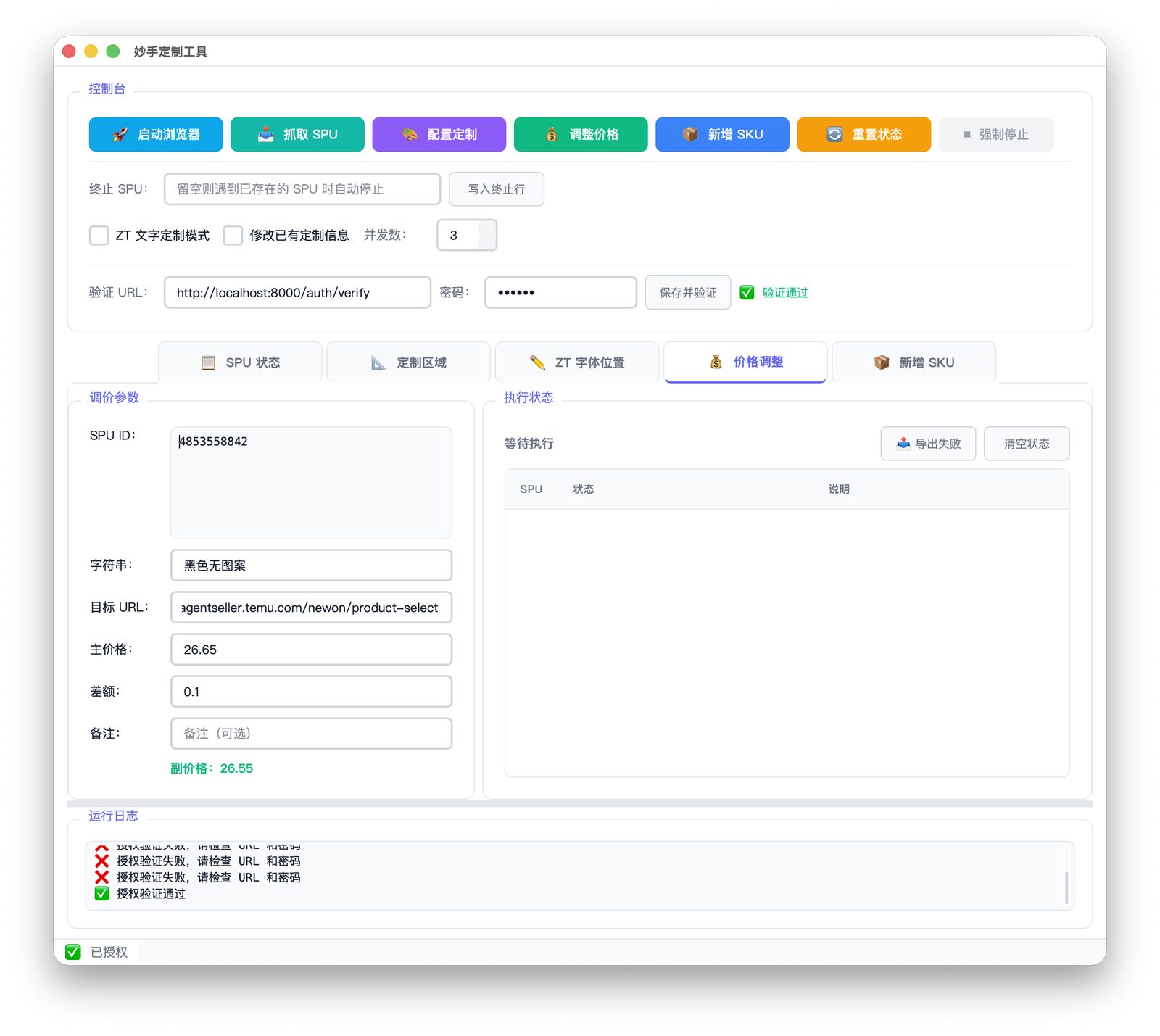
Selects the target groups in the repricing drawer by keyword, then fills the primary price on the first row and the secondary price (primary − delta) on the rest. Before touching anything it reads the current declared price and skips whatever is already below target.
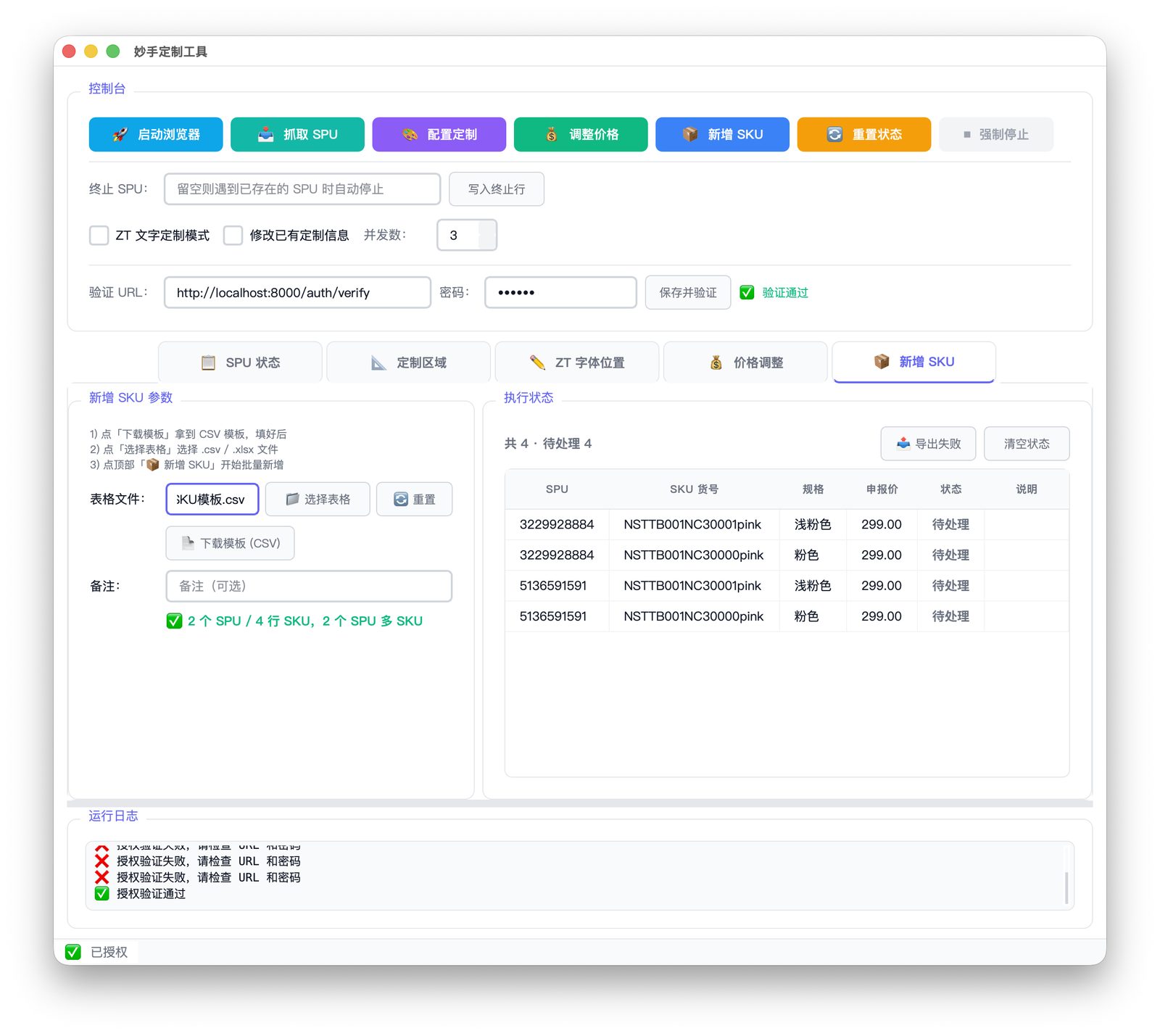
All four share one shell: a console strip at the top to launch the browser and trigger jobs, five tabs below it for queue status, custom-region geometry, text-customization positions, repricing parameters, and the add-SKU spreadsheet, and a live log along the bottom. What the operations team receives is an app they double-click — no Python install, no command line.
Interface
Every coordinate lives in local JSON — edit, save, and the next run picks it up without a rebuild.
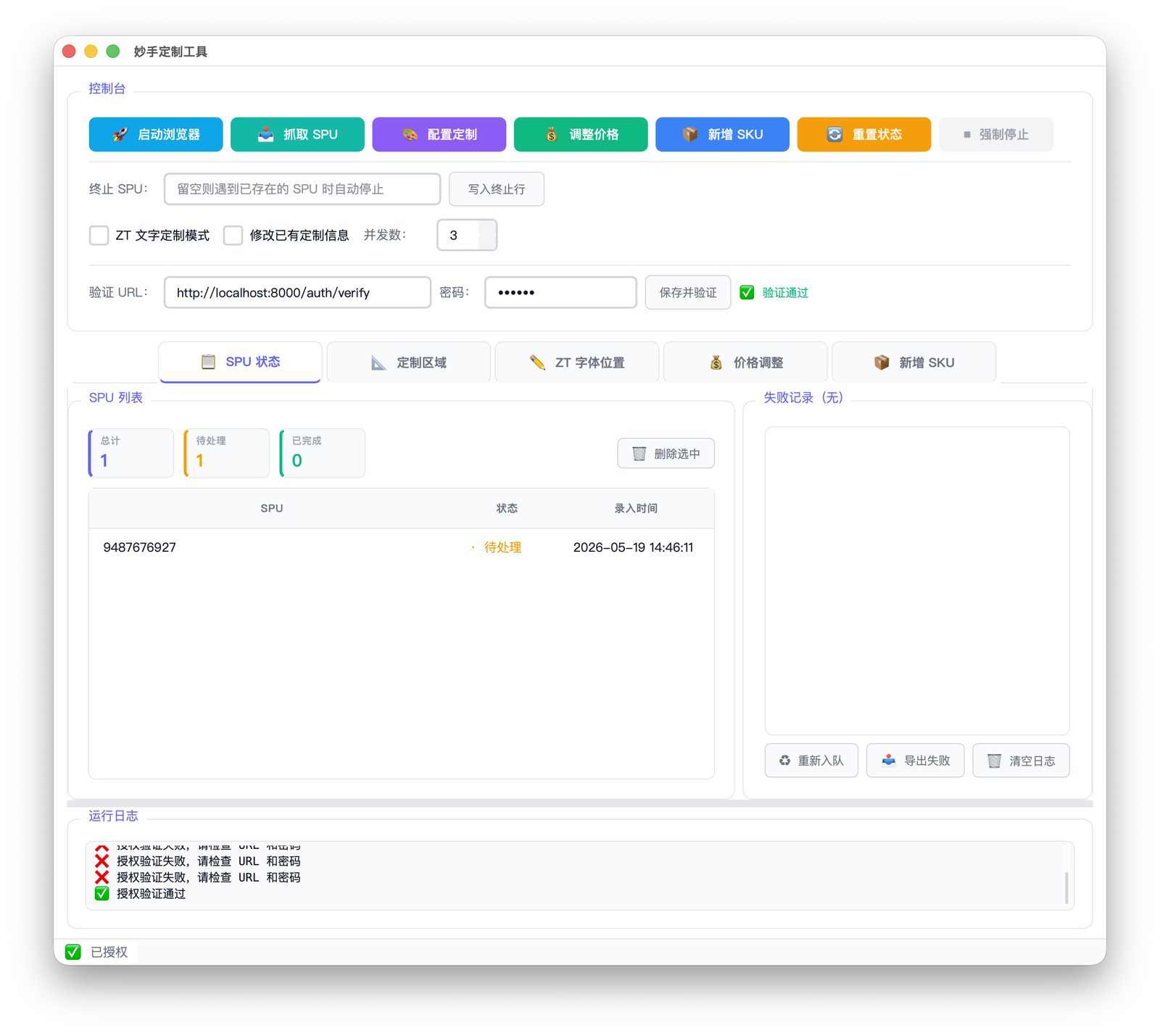 Queue: total / pending / done counters, with failed items and re-queue on the right
 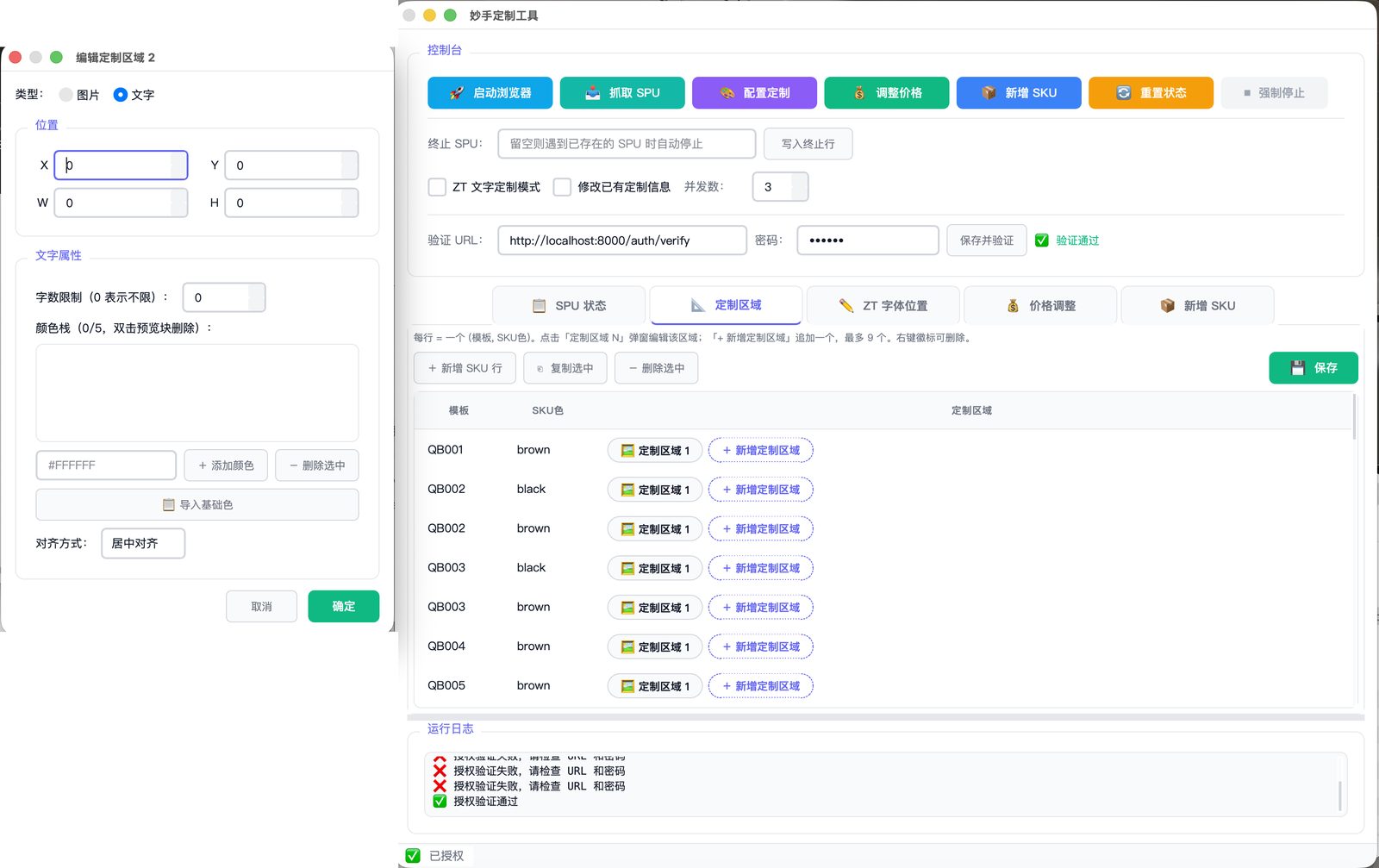 Custom regions: one row per (template, SKU color); the dialog edits geometry, limits, colors, alignment
 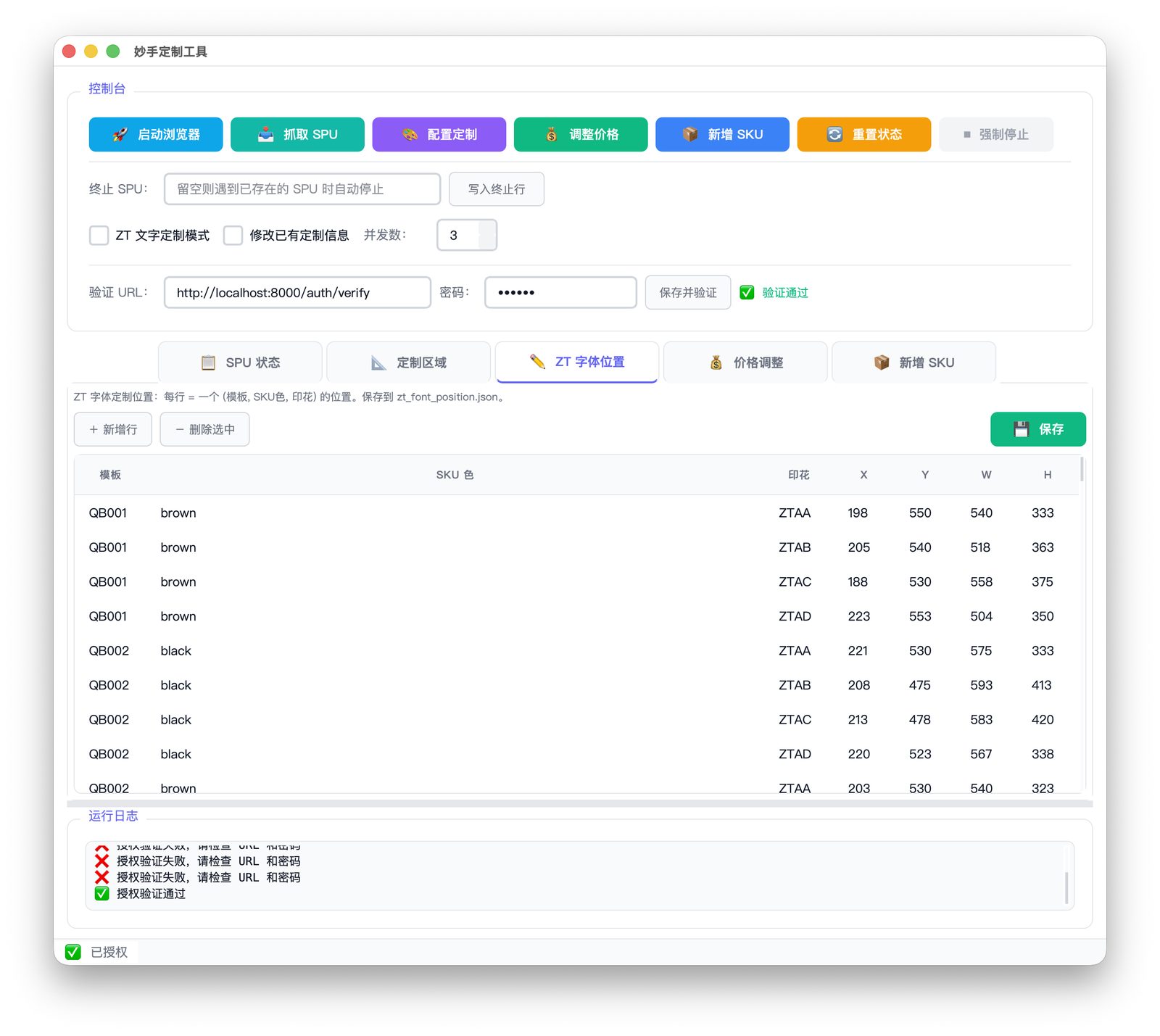 Text positions: each (template, SKU color, artwork) triple maps to one X/Y/W/H
 Repricing and SKU creation are both driven by parameters plus a spreadsheet; status is written back row by row and failures can be exported on their own.
The first version launched a clean Playwright browser and got stuck at the login every single time — captchas, SMS codes, device checks, someone babysitting each run. Switching to CDP takeover meant attaching to the Chrome the operator already has open: session, cookies, extensions all still there, and the tool just opens a few more tabs.
self.browser = await self.playwright.chromium.connect_over_cdp("http://127.0.0.1:9222")
self.context = self.browser.contexts[0]      # reuse the logged-in context

sem = asyncio.Semaphore(max_concurrent)      # parallel pages in that same context
await asyncio.gather(*[self._process_spu(spu, sem) for spu in spu_list])The time never goes into “which button do I click” — it goes into the page not responding the way you expect. A React re-render detaches the element you just resolved. A value written with fill() gets reset by the component a moment later. The color picker gets a click on “add” and simply doesn’t open. So every layer has to catch itself.
Field fill ×5Fill, Tab out, then read the control back to confirm the value landed. If it didn't, back off and retry, with the delay growing each round.
Per product ×3If the whole flow for a product fails, close the tab and start it over on a fresh one so no dirty state carries into the next attempt.
Picker ×3 / ×4Click "add" again if the picker didn't open; click "confirm" again if it didn't close. RGB channels are typed character by character so the component sees every input event.
Idempotent skipsProducts already configured are skipped outright; repricing reads the current price first and leaves anything already below target alone; rows marked done or skipped never run twice.
Anything that exhausts its retries gets written to a failure log and surfaced in the app’s failed list, ready to re-queue or export — so one stuck item doesn’t invalidate a whole batch. The other recurring problem was matching: spec names in the console mix full-width and half-width characters, Chinese and English, with stray spaces. Plain string comparison was guaranteed to miss. Normalizing both sides with NFKC + whitespace stripping + casefold before comparing made the “Chinese SKU never matches” bug disappear.
async def _fill_number_with_retry(self, loc, target: str, label: str):
  for retry in range(1, 6):
      await loc.click()
      await loc.fill(target)
      await loc.press("Tab")
      try:
          await expect(loc).to_have_value(target, timeout=3000)   # read back
          return
      except Exception:
          if retry == 5:
              raise ValueError(f"[{label}] fill failed after max retries")
await asyncio.sleep(0.5 * retry) # back off, refillThe automation core is pure asyncio; the interface is Qt. Each has its own event loop. Every job runs on its own QThread with a fresh event loop inside it, and print from the coroutines is turned into Qt signals by swapping out sys.stdout — which meant the entire command-line era’s output became a live log pane without editing a single line of core code.
Force stop works by stopping the worker’s event loop from the main thread via call_soon_threadsafe. The subtlety is teardown: cancelled Playwright coroutines occasionally park inside a native call, and without a time-boxed cleanup the thread never returns — so the exit path has a deadline on it. The task table itself is a state machine (pending / running / done / failed / skipped), so stopping and restarting simply passes over what already succeeded. Resumability comes for free.
- ›One QThread per job
- ›Its own asyncio loop inside
- ›Signals back to the UI thread
- ›call_soon_threadsafe to stop
- ›sys.stdout swapped for a signal stream
- ›Zero changes to core code
- ›Appended live, line by line
- ›Original tracebacks preserved
- ›Cross-platform user data dir
- ›Seeded from the bundle on first run
- ›Geometry JSON / queue CSV / failure log
- ›Upgrades keep existing config
It started as a command-line script, but the moment the audience is the operations team, the command line is the barrier. The shipped version is compiled with Nuitka into macOS and Windows executables, alongside launcher scripts that find Chrome themselves and start it in debugging mode, downloadable spreadsheet templates, and config that seeds itself into the user data directory on first run. On startup it validates a license against an internal service and shows an “authorized” badge in the status bar. The tool stores no platform credentials of its own — it only ever uses the browser the person is already signed into.
Outcome
The tool has covered template configuration, SKU creation, and repricing for roughly 780 personalized products, turning “an operator clicks for a few minutes” into “add it to the queue and wait.” What matters more is that failure stopped being a black hole: which item stalled, at which step, and whether to retry it are all visible on screen. It ended up as one half of a single pipeline alongside the POD operations platform — the platform handles artwork, listing, and print output, while this handles the parts of the console that can only be clicked.