DESIGN DECISION
Edge compute and remote UI are separated
Jetson Nano performs recognition and control. Flask exposes status and commands, while React handles live monitoring, stops, and manual takeover.
ROSJetson NanoTensorRTReactFlask
Based on the ROS framework, built a campus intelligent bus system integrating LiDAR, depth camera, and Mecanum wheel chassis to achieve multi-sensor fusion perception and obstacle avoidance control in complex campus environments. Independently completed the full-chain development of the YOLOv5 model from dataset annotation and training to Jetson Nano edge deployment, and accelerated inference performance through TensorRT. At the same time, built a remote monitoring and interaction system based on React + Flask, integrating voice and gesture interaction logic to achieve highly coordinated closed-loop control of hardware and software robots. This project won the third prize at the 26th China Robot and Artificial Intelligence Competition.
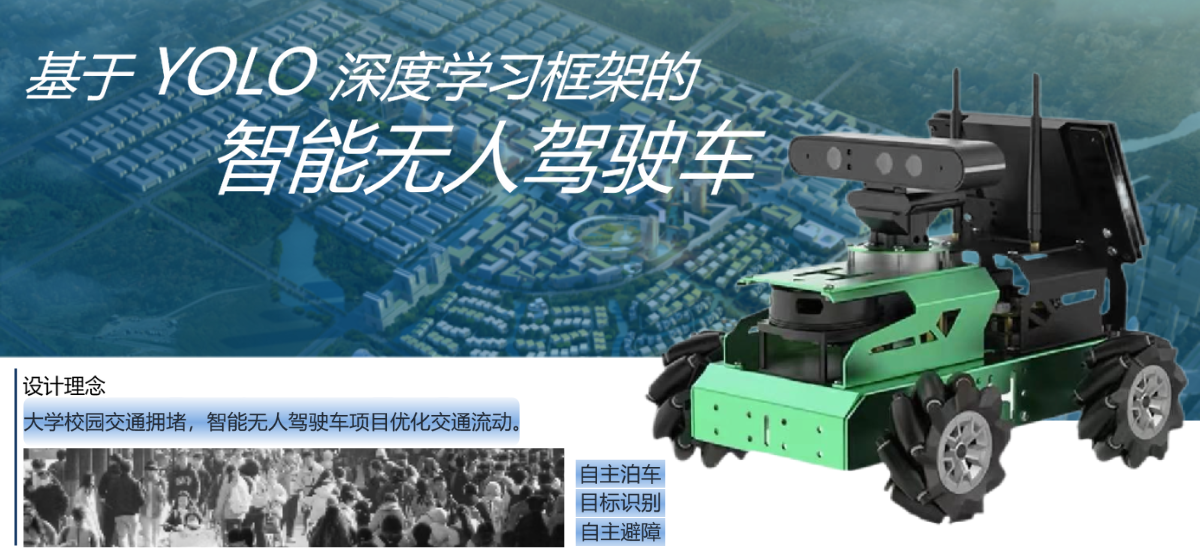
Based on the YOLO deep learning framework, an intelligent unmanned campus bus.
ROBOTICS CONTROL LOOP
LiDAR, depth imagery, and recognition describe the campus while ROS turns perception into avoidance, stopping, and motion.
DESIGN DECISION
Jetson Nano performs recognition and control. Flask exposes status and commands, while React handles live monitoring, stops, and manual takeover.
CAPABILITIES


For the target recognition requirements, we adopted the smallest Yolov5 nano model in the Yolov5 framework as the training model to ensure the highest recognition efficiency. To achieve precise recognition, we constructed a dataset containing 13 categories for model training, with 300 images collected for each category. Since the generalization ability requirement of the model in this project is not particularly high, during the training process, we used a higher number of training epochs on a larger training set to train the model as fully as possible, resulting in an accuracy rate of over 80% on the test set. By recognizing road signs, the current station is identified, and using the distance returned by the depth camera to the road sign, the campus bus can stop at an appropriate distance to allow passengers to get on and off.

This project is the frontend part of an intelligent unmanned campus bus based on the YOLO deep learning framework, with main functions including:

Development Notes: React NextJS App Router Real-time API Fetching
On the campus bus, a Flask framework is used to build an API server, which obtains campus bus data and sends control signals through the API.
The frontend of this project is mainly developed using React under the NextJS framework. While implementing basic functions, when faced with the need to fetch data in real-time, I did not use other third-party libraries to achieve API fetching. Instead, I implemented data-fetching based on the NextJS official documentation.
Finally, after various attempts and combinations, I came up with a reasonable solution: calling getLocationInformation() inside useEffect, and adding next: {revalidate: 0} in the code that fetches the backend API. The code is as follows:
// Code to fetch backend API
export async function GET(request: NextRequest) {
    const res = await fetch(URL + '/api/information', {
        headers: {
            'Content-Type': 'application/json',
        },
        next: {revalidate: 0} // Revalidate data after 0 seconds
    })
    const data = await res.json()
    // return Response.json({ data })
    return NextResponse.json({ data })
}

// Code to call local API
useEffect(() => {
        getLocationInformation();
    });

async function getLocationInformation() {
    const res = await fetch('/api/getLocationInformation');
    if (!res.ok) {
        setMessage("Connect fail!");
        return;
    }
    const data = await res.json();
    setLocationInformation(data.data);
    setRootLocationInformation(data.data);
    for (var _ in data.data) {
        if (data.data[_]["is_arrived"]) setIsNextLocation(LocationInformationLinkedList[_ as keyof TypeLocationInformationLinkedList])
    }
    console.log(locationInformation)
}
My personal understanding is that next: {revalidate: 0} tells NextJS to revalidate the data after 0 seconds when fetching data, which enables real-time data fetching. Additionally, due to the use of the useEffect function, the backend fetches new API data each time, allowing the page to update in real-time. This can be considered a reasonable solution.