Temu E-commerce Operations PlatformTemu E-commerce Operations Platform|
Jan 12, 2026 - Jun 5, 2026
Business Tools
E-commerce
Automation
Vue 3
TypeScript
FastAPI
Python
PostgreSQL
Cloudflare R2
SSE
Gemini AI
Playwright
PySide6
A full-stack e-commerce operations automation platform independently designed and developed for Temu POD cross-border sellers. It covers order processing, product template management, batch Excel generation, concurrent image upload, AI image processing, print library and tag management, mockup batch rendering, render-job tracking, log analytics, MCP integration, plus Miaoshou custom-product SPU, SKU, and price automation. The backend is built with FastAPI + PostgreSQL, with SSE real-time streaming for long-running tasks; the frontend is built with Vue 3 + TypeScript + Naive UI, integrating Google Gemini multimodal API, Cloudflare R2, Playwright browser automation, and a PySide6 desktop automation toolchain.
Automation-driven operations — freeing sellers from repetitive manual work.
Day-to-day POD operations on Temu involve a large amount of manual work: filling product Excel sheets according to category-specific rules, maintaining template SKUs with colors and sizes, uploading product images to cloud storage, parsing exported orders and matching customer-customized images, removing watermarks, generating mockups in batches, and exporting heat-transfer images and spot-channel TIF files. These workflows are tedious, error-prone, and had little reusable engineering foundation.
This project is the full-pipeline automation system I designed and continuously expanded after taking over these workflows as an engineer. The goal is not only to reduce clicks, but to bring products, assets, orders, rendering jobs, output files, and browser automation into one configurable, traceable, and extensible toolchain.
Project Info
RoleSolo Full-Stack Dev
Timeline2026.01 — 2026.06
TypeOperations Automation Platform
Scale12 Pages · 15 Routers · Desktop Tool
12
Operation Pages
SSE
Real-time Streaming
182
Product Templates
6823
Print Assets
System Architecture
Frontend · Vue 3 SPA
Vue 3 Composition API TypeScript · Vite Naive UI · Pinia Vue Router · ofetch
/excel/upload/order/ai-generate/mockup-render/mcp+9 more
ORM · S3 API
Storage · Multi-datasource
PostgreSQL — Image library metadata SQLite — Order history JSON — SKU mapping · Resource index Cloudflare R2 — Image CDN
Each datasource chosen for its access pattern
Business Loop
Product & Assets
Template management, SKU/color/size metadata, title libraries, print libraries, tag imports, PSD assets, and image-status checks.
TemplatesPrint LibraryTitle Library
Listing & Operations
Plan multi-store upload tasks, generate Temu / Miaoshou Excel files, upload assets to R2, and support campaign and price-related operations.
ExcelR2 UploadCampaigns
Orders & Output
Parse exported orders, validate customer-customized images, export heat-transfer images, generate TIF files by SKU or package, and support custom image-to-TIF batches.
OrdersHeat TransferTIF
In the current running version, the platform is no longer just an “Excel generation + image upload” tool. It has become a workspace for the full POD operation lifecycle: order processing, campaign management, template management, Excel generation, image upload, AI watermark removal, print library, print tags, batch rendering, render jobs, log analytics, and MCP integration. Long-running operations share one task interface and one SSE log-stream pattern, so operators no longer need to jump between spreadsheets, terminals, browsers, and local folders.
Runtime Screenshots
Core Operations Workspace
Captured from the live running platform, showing the three core operation entry points: orders, templates, and print assets.
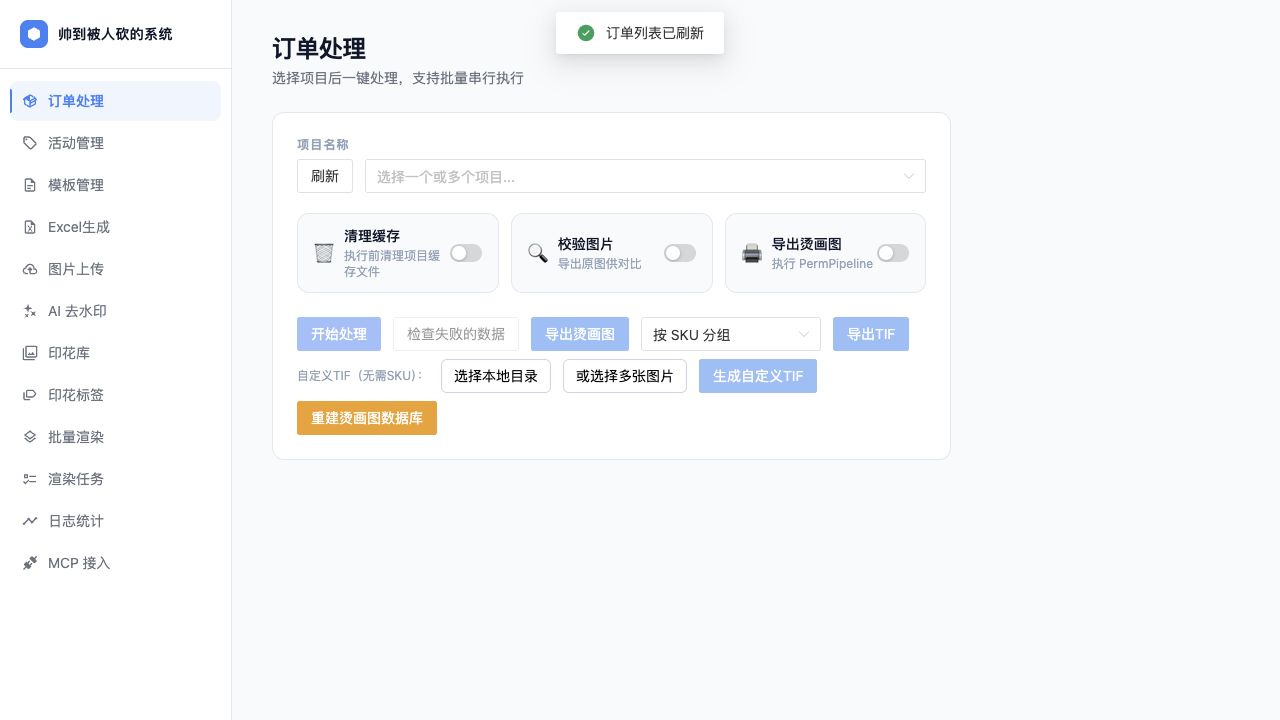
Order processing: batch execution, failed image checks, heat-transfer export, and TIF generation
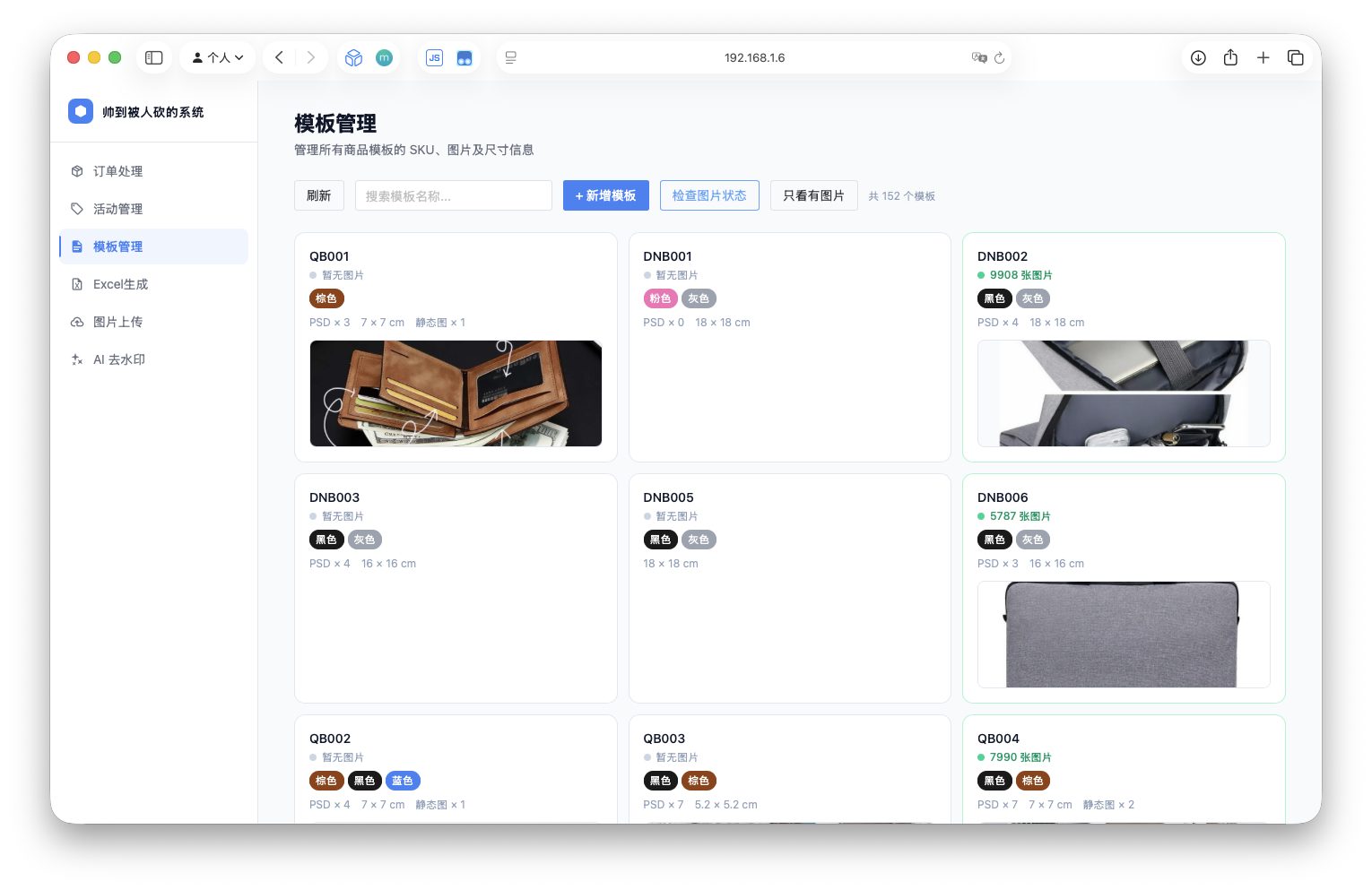
Template management: 182 product templates with SKU, color, PSD, and image status
Print library: 6823 print assets with tag import and management
Batch Rendering and Job Tracking
The render-job view exposes batch-level progress, including a QB015 job that rendered 2006 images from 6 mockups in roughly 5 minutes 26 seconds.
Mockup rendering: select a template, configure print regions, and submit batch generation
Render jobs: batch status, progress, elapsed time, and throughput metrics
Earlier template-management screenshot
POD OPERATIONS SYSTEM
One operations pipeline from templates and prints to order output
The platform turns POD work scattered across spreadsheets, browsers, folders, and local scripts into a configurable, traceable, reusable automation system.
01 TemplatesSKU, color, size, PSD, and asset state
04 Batch RenderRegion setup and thousand-image mockups
05 Order OutputHeat-transfer files, W1 TIF, failure checks
LIVE WORKSPACE
A real operator workspace, not a folder of scripts
The current platform has 12 main pages: orders, campaigns, templates, Excel generation, image upload, AI watermark removal, print library, print tags, batch rendering, render jobs, log analytics, and MCP integration. Long-running work shares one task submission and SSE log-stream pattern, so operators can see execution state inside the UI instead of waiting beside a terminal.
12Operation Pages
15Backend Routers
182Product Templates
6823Print Assets
CORE PIPELINE
The business flow is a feedback loop around asset state
TemplateMaintain product metadata, colors, sizes, and PSD import state
PrintManage renderable assets by tags, prefix, and combination ID
PlanUse upload_plan to orchestrate stores and date-based batches
RenderGenerate product mockups from configured print regions
OrderParse exported orders and match customer-customized images
OutputProduce heat-transfer files, grouped TIFs, and failure lists
PODState Loop
01 SSE TasksFastAPI StreamingResponse + useSSETask gives Excel, upload, AI, rendering, and orders the same progress channel.
02 Config Drivensettings.yaml, catalog.yaml, and upload_plan.json move stores, templates, paths, and dates out of code.
03 Concurrent UploadThreadPoolExecutor + boto3 targets Cloudflare R2 and rebuilds the resource index for orders and templates.
04 AI Image WorkGemini 2.5 Flash handles hard watermark cases; failed images enter retry queues with streamed logs.
05 Template RenderPSD regions, OpenCV composition, print tags, and render jobs are separated to keep configuration and output logic clean.
06 Miaoshou AutomationPySide6 desktop tooling and Playwright browser automation cover SPU, SKU, and price workflows outside the web app.
BATCH RENDERING
Mockup creation becomes an observable batch job
The render-jobs page shows batch status, progress, elapsed time, and throughput. One QB015 batch generated 2006 output images from 6 mockups in about 5 minutes 26 seconds, making stalls, failures, and cleanup needs visible to operators.
2006 images in one batch6.2 img/s peak throughputSSE progress streamTraceable failures
Order Output Flow
01
ImportSelect one or more exported order projects
02
CheckValidate customized images and missing assets
03
ProcessRoute normal/custom orders through different pipelines
All long-running tasks share the same problem: they take seconds to minutes, and users need real-time progress feedback. I chose SSE over WebSocket — pure HTTP unidirectional push, no protocol upgrade required, and a natural fit for FastAPI’s StreamingResponse. The backend assigns a UUID to each task; the frontend useSSETask composable manages connection lifecycle, giving all modules zero-boilerplate integration.
SSE FLOW
POST /processTrigger task
uuid4()Assign task ID
GET /sse/{id}Frontend subscribes
StreamingResponsePush line by line
LogStream.vueRender in real time
@router.get("/sse/{task_id}")
async def sse_stream(task_id: str):
  async def event_generator():
      queue = task_queues.get(task_id)
      while True:
          msg = await queue.get()
          if msg is None: break       # task done signal
          yield f"data: {msg}\n\n"
  return StreamingResponse(event_generator(), media_type="text/event-stream")
02CONCURRENCY
48-Thread Concurrent Upload Pipeline
ThreadPoolExecutor · boto3 · Cloudflare R2 · Resource Index Rebuild
Image upload is I/O-bound — network transfer dominates over CPU time. Using ThreadPoolExecutor(max_workers=48) compresses serial upload time to roughly 1/48. The value 48 was determined empirically as the optimal balance between R2 API rate limits and local bandwidth. After upload completes, the system automatically rebuilds the data.json resource index — the single data contract between the upload and order modules.
THROUGHPUT COMPARISON
Serial upload1 image/request
Concurrent ×48~48× faster
with ThreadPoolExecutor(max_workers=48) as executor:
  futures = {executor.submit(upload_single, p, bucket): p for p in paths}
  for future in as_completed(futures):
      try:
          future.result()
          task_queue.put(f"✓ {futures[future].name}")  # SSE push
      except Exception as e:
          failed.append((futures[future], str(e)))
rebuild_index(bucket)   # rebuild resource index
03VUE 3 · TS
Vue 3 Composition API Frontend Architecture
Composable · Pinia · TypeScript · Separation of Concerns
Core principle: the view layer only renders; business logic lives in Composables. Four Composables each own their domain and compose with each other — useOrderTask internally composes useSSETask, reusing log-stream logic without duplication. TypeScript unified request/response types across 10 API modules, catching field-rename errors at compile time during multiple refactors.
useSSETaskgeneric
Manages SSE connection lifecycle, exposes logs / isRunning — reused by all modules
useOrderTaskorders
Order selection, pre-processing, batch submission, failedImages state — composes useSSETask
usePlanEditorconfig
YAML Plan CRUD: GET load → local edit → POST persist
useUploadEditorupload
Upload task config management, same pattern as usePlanEditor with added field validation
04FASTAPI · DB
FastAPI Modular Backend · Multi-datasource Design
Router · Service Layer · Pydantic · SQLModel · Alembic
Router Layer
›Exposes HTTP endpoints only
›Pydantic input validation
›Calls Service, no business logic
›15 domain-split routers
Service Layer
›Core business logic
›Independently unit-testable
›Cross-router logic reuse
›Encapsulates external API / browser automation calls
Storage Layer
›PostgreSQL — structured metadata
›SQLite — lightweight local history
›JSON/YAML — config and indexes
›R2 — image object storage
SQLModel (SQLAlchemy + Pydantic fusion) lets the same Model class serve as both ORM mapping and API schema, eliminating redundant definitions. Alembic manages PostgreSQL migration history so every schema change is versioned. The three datasources were chosen for their access patterns — not over-engineering, but the right tool for each job.
Traditional watermark removal relies on fixed-position masks, but product image watermarks vary in position, font, and opacity. By integrating Gemini 2.5 Flash multimodal, the system feeds the image together with natural language instructions, letting the model semantically understand and execute the edit.
The engineering focus was prompt engineering: a template structure of “describe task + constrain format + provide example”, with separate strategies for solid-color vs. complex backgrounds. Failed images enter a retry queue, with full SSE progress streaming throughout.
AI PIPELINE
InputProduct image + prompt template
InferGemini 2.5 Flash multimodal
OutputProcessed image base64
WriteSave result + SSE notify
RetryFailed images → retry queue
06ORDER · TIF
Order Processing, Heat-transfer Export, and Spot-channel TIF
The order module is designed around the path from exported platform orders to deliverable image files. Operators can select one or more order projects, run either preprocessing or direct processing depending on normal/custom type, check failed images, export heat-transfer images, and generate W1 spot-channel TIF files grouped by SKU or by order/package. Temporary assets that do not need SKU mapping can also be converted into custom TIF batches from selected local images.
ORDER OUTPUT FLOW
OrderSelect one or more exported projects
ProcessPreprocess custom assets or run directly
CheckCollect failed images for comparison
OutputExport heat-transfer and processed images
TIFGenerate spot-channel files by SKU/package
The key engineering choice is to turn manual file organization into repeatable pipelines: failed images are collected separately, heat-transfer assets are packaged in batches, and TIF export surfaces missing perm_size or missing-print warnings through the UI. Naive UI notifications keep warning details visible, reducing the risk of a task “succeeding” while producing unusable files.
Early scripts had parameters scattered through code: changing a store, template, or output directory meant editing scripts. The current system extracts task definition from execution logic. settings.yaml describes default paths and globals, catalog.yaml merges product catalog metadata, and upload_plan.json orchestrates date-based batch tasks. The same backend pipeline exposes both CLI and HTTP APIs: command line for development/debugging, frontend buttons for operations.
Config Loading
› settings.yaml defaults
› settings.local.yaml overrides
› catalog.yaml product merge
Task Planning
› Filter by date
› Skip done=true entries
› Single-task and plan modes
Execution
› Typer CLI debugging
› FastAPI HTTP calls
› Unified SSE log streaming
08RENDER · ASSET
Template, Print Library, and Batch Rendering Pipeline
POD product imagery is not just image upload. It depends on base mockups, prints, colors, customization type, and output format. The platform separates template configuration, print tags, PSD import, region configuration, and rendering jobs into dedicated modules. Template pages manage product metadata, the print library manages assets and labels, batch rendering composites prints into mockups, and the render-job page tracks asynchronous task state.
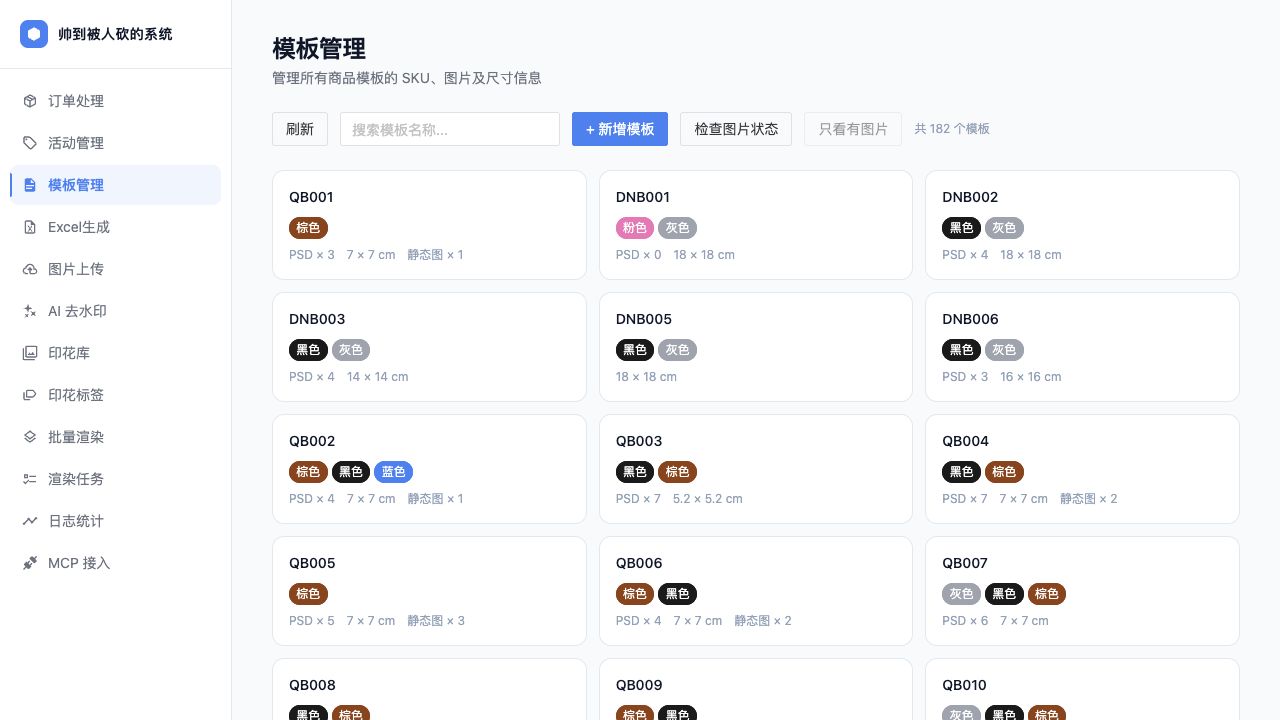 Template management: 182 product templates with SKU, color, PSD, and image status
  Print library: 6823 print assets with tag import and management
 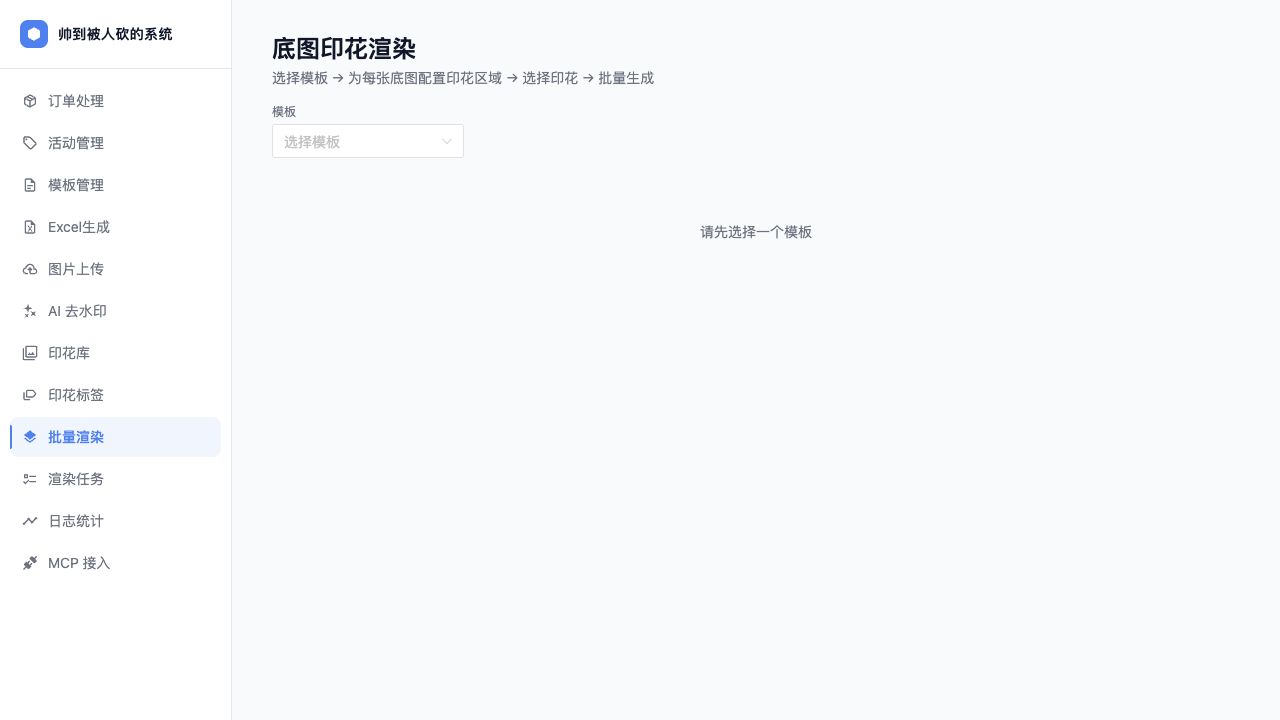 Mockup rendering: select a template, configure print regions, and submit batch generation
 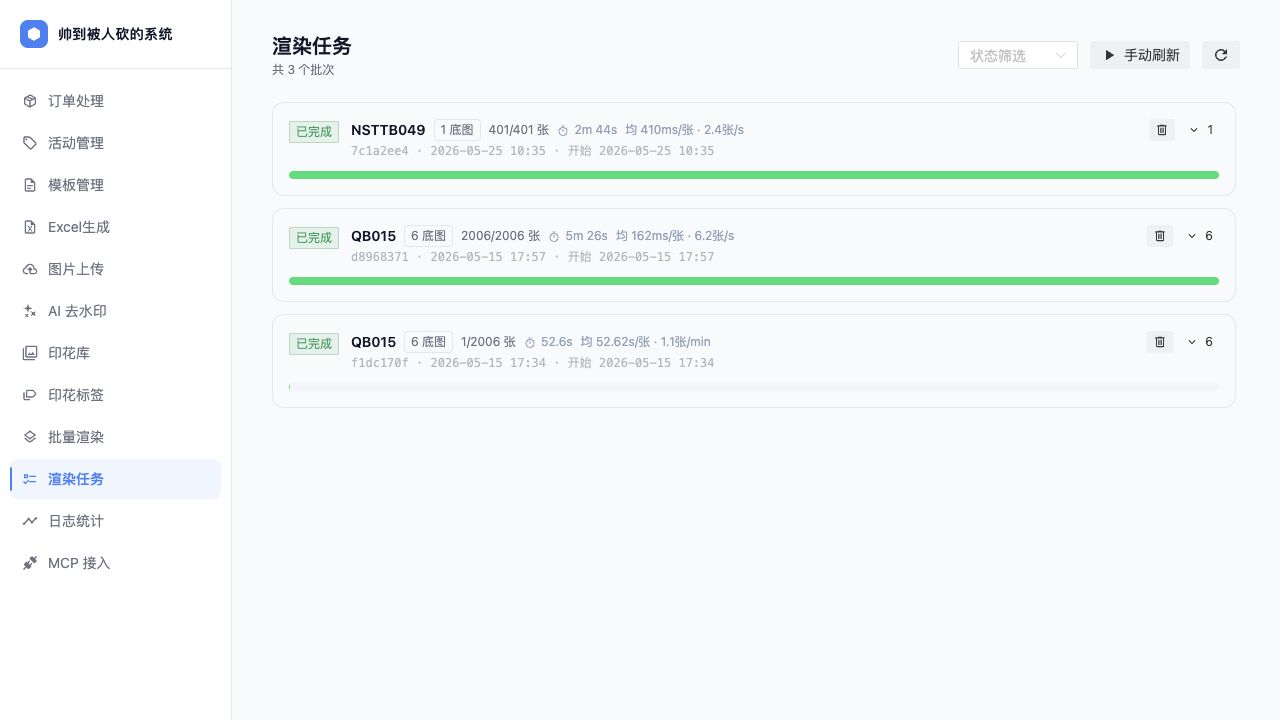 Render jobs: batch status, progress, elapsed time, and throughput metrics
  Earlier template-management screenshot